Configure CI runners for Cursor Origin
EngFlow now integrates with Cursor Origin as a beta release, bringing Bazel builds and tests for your Origin repositories. It enables teams to offload Bazel-based CI jobs to EngFlow's managed, autoscaling infrastructure, directly within Cursor Origin, without provisioning clusters or hand-tuning CI configuration. The integration picks up each pull request, builds it on an isolated runner, and posts every check back as it finishes.
Prerequisites
- An Origin hosted repository
- Origin workspace admin access.
Sign up to EngFlow
This is a one-time process; skip this step in future runs
- Go to EngFlow and sign up.
- EngFlow emails you a link and instructions. Open the link to continue.
Set up Origin connection from EngFlow
After signing up to EngFlow, you need to install the Cursor Origin app.
- Visit the EngFlow page.
- On the Cursor Origin card, click Connect.
- Choose all or selected repositories. Click Install.
- You should be redirected to EngFlow.
-
Add .engflow/jobs/job.json on the repository’s default branch
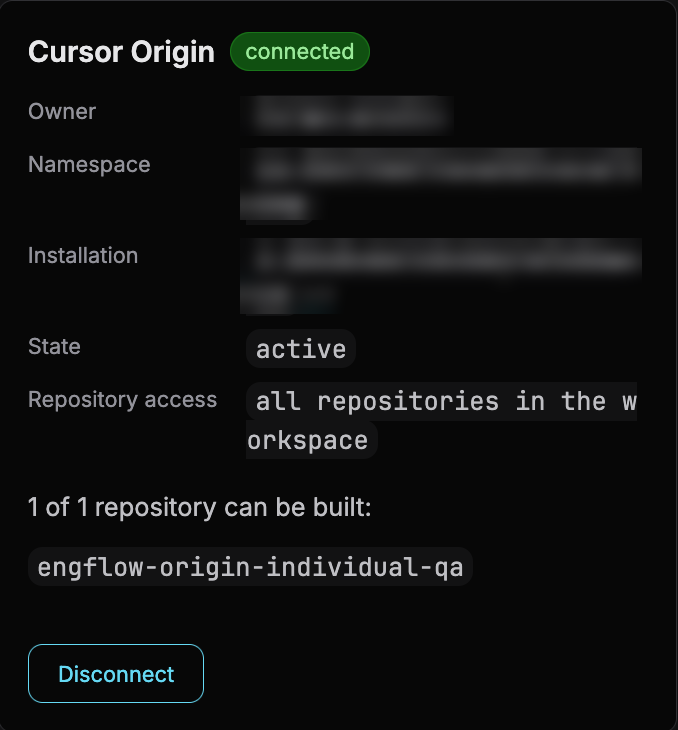
When the connection succeeds, the Cursor Origin card on the EngFlow page shows a connected pill, along with the owner, namespace, installation, state, and repository access that EngFlow recorded.
Note
Installing the app also establishes a verified contact for service and quota notices.
Connect an existing Buildkite pipeline
If you are running pipelines on Buildkite you integrate them with EngFlow and Origin. Buildkite keeps orchestrating your builds; EngFlow supplies the machines they run on and keeps Bazel warm.
- Make sure you are logged in at EngFlow.
- Click Connect inside the Buildkite card.
- Authorize EngFlow to connect to your organization.
-
Add EngFlow CI Runners as agents by adding them to your
pipeline.yml:
How builds run
- Open a pull request, or push to your Origin repository. Origin notifies EngFlow.
- EngFlow runs each job on a managed runner, in its own isolated micro-VM.
- EngFlow keeps your PR updated with the job status.
Permissions
The EngFlow app requests the minimum needed to check out and build your code. Origin fixes the scopes at install time, so widening them later requires you to re-consent.
| Scope | Why EngFlow needs it |
|---|---|
repository:contents:read |
Clone the repository to build it, and read job configs. |
repository:metadata:read |
Basic repository metadata. Origin adds this automatically. |
repository:pull_requests:read |
Read pull requests and changed files to discover what a build is for. |
repository:checks:write |
Create and update check suites and runs. |
Origin app management
Uninstall the app
Uninstalling stops builds and removes EngFlow's stored state. Origin revokes EngFlow's access immediately, so in-flight jobs lose access too.
- Visit the EngFlow page.
- On the Cursor Origin card, click Disconnect.
Limitations
- Origin hosted repositories only.
- Linux x86-64 only.
- Warm Bazel is only available for Bazel jobs.