Multitenancy
EngFlow clusters support multitenancy: the ability for more than one organization to store data and execute actions on a cluster, isolated from other organizations.
This page explains how multitenancy works on EngFlow.
See also:
- Getting Started: instructions on setting up your projects and your organization to use multitenancy.
- Roles, Policies, and Permissions: an explanation of EngFlow's tenant-aware authorization system.
What is a tenant?
A tenant (also known as an instance) is a namespace for resources within an EngFlow cluster. Users can execute actions and read or write cache files in a specific tenant. Resources created in a tenant are isolated from other tenants.
As a concrete example, you can configure Bazel to use the tenant neuroflux using the flags below. Both flags are required.
These flags cause Bazel to set the instance_name field in the remote execution and build event service protocols, respectively. EngFlow interprets this as a tenant name. Action cache entries and content addressable storage files uploaded to the neuroflux tenant are not available on other tenants.
Subtenants
A subtenant is a tenant nested within another parent tenant. A subtenant has a name with multiple components separated by dots, like aaa.bbb.ccc. The parent of subtenant aaa.bbb.ccc is aaa.bbb, without the rightmost component. The base tenant is just the leftmost component, aaa in this case.
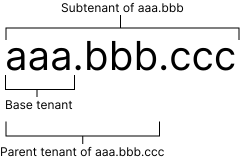
A subtenant automatically provides access to its parent tenants' resources, if the client is authorized to access those resources.
For example, this functionality may be used to create a trusted CI environment for creating releases.
- A CI user has read-write access to tenant
main. It only builds code that has been reviewed and merged onto the primary branch. Builds are only performed on trusted machines. - A developer with limited privileges has read-only access to tenant
mainand read-write access to the subtenantmain.dev. They automatically can use action cache entries frommain, speeding up the build. They can only write new entries tomain.dev, since they're building untrusted code.
Content Addressable Storage (CAS) is shared across all subtenants of a base tenant, unlike other resources. For example, a file written to tenant main.dev1 is readable in tenant main.dev2 and in main.
Permission to access a subtenant must be granted explicitly, just like a normal tenant. Typically, a user role for a subtenant should have read-write access to the subtenant and read-only access to parent tenants for most resources; it should have read-write access to content addressable storage for the base tenant.
Support for subtenants must be enabled explicitly using the --enable_subtenants=true flag in the EngFlow configuration. Contact support to enable subtenants.
Managing access to tenants
EngFlow manages access to tenants through two APIs.
The IAM API is a gRPC API that cluster administrators (with the global-admin built-in role) can use to define and manage roles. A role is a set of resources and a set of actions that can be performed on them. Typically, an administrator creates one or more roles per tenant, granting varying levels of access to that tenant.
Roles are assigned to users via the OpenID Connect (OIDC) API. Cluster administrators decide which roles each user should have, then assign roles by setting the engflow_roles custom claim to a list of role names.
See Roles, Policies, and Permissions for more information.
Current limitations
EngFlow's support for multitenancy is still under active development, though several customers are using it in production. Our current implementation has some limitations that we plan to fix soon.
- The Resource Usage API provides limited support for collecting usage data on each tenant. We plan to provide a simpler, more convenient API in the future.
- Worker instances are currently shared across tenants. We plan to implement a permissioning system so that workers can be limited to executing actions on specific tenants.
We have several more features planned. Please contact support for more information.